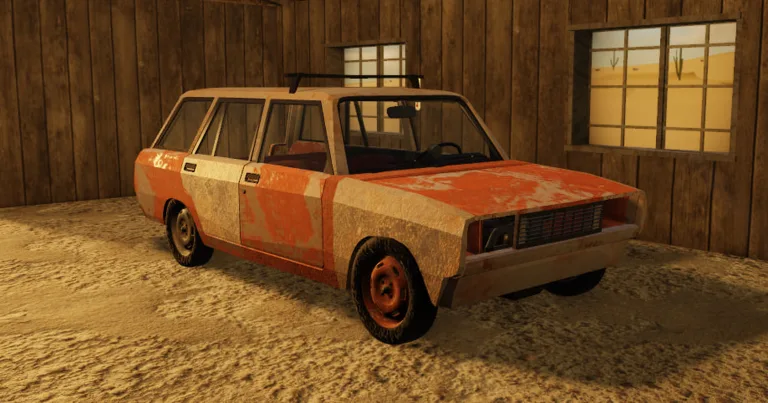
A Desrt Roblox How to Use Paint Spray: Creative Guide
Learn how to use paint spray in A Desrt Roblox effectively. Discover customization tips for your sandbox creations in this comprehensive building guide.
Published: A desrt Wiki Editorial Team
Table of Contents
Master Your Sandbox World in A Desrt
If you have been spending hours constructing vehicles or elaborate structures in the sandbox world of A Desrt, you know that structural integrity is only half the battle. Personalizing your creations is what truly makes them stand out, and understanding a desrt roblox how to use paint spray is the key to transforming your plain gray builds into vibrant, custom-themed masterpieces.
In this guide, we will explore the mechanics behind aesthetic customization. Whether you are aiming for a rugged military look for your transport truck or a sleek, futuristic design for your custom aircraft, knowing how to apply textures and colors changes the entire player experience. Let’s dive into how to elevate your sandbox game to the next level.
Understanding the Customization Tools in A Desrt
Before you start spraying your creations, it is essential to distinguish between the various tools provided by DarkCodes studio in the A Desrt ecosystem. While many players focus on logic systems—like linking electric engines to 16v batteries—visual flair is equally vital for content creators.
In most sandbox titles on the Roblox platform, "paint spray" or decal tools function by projecting a texture onto the surface of a part. Unlike basic building, which relies on weld mechanics (the 'Z' key) and physical connectivity, painting is a surface-level modification that does not affect the physics of your build.
Comparison of Primary Building & Customization Tools
Tool Name
Primary Function
Interaction Key
Impact on Build
Hammer
Welds parts together
Z
Structural (Essential)
Linker Tool
Connects logic/controls
Click/Drag
Functional
Paint Spray
Applies aesthetic layers
Select/Aim
Cosmetic (Visual)
Drag Tool
Moves/Aligns parts
Click/Drag
Positional
Step-by-Step: Applying Paint to Your Creations
To master a desrt roblox how to use paint spray, you need to follow a consistent workflow. Community members often report that the most common mistake is failing to "lock" the surface before applying the paint, which can lead to color bleeding onto unintended parts.
Select Your Item: Ensure the part you wish to paint is placed correctly on your build.
Equip the Paint Tool: Access your toolbar and select the spray paint or color-applicator tool.
Target the Surface: Hover your cursor over the specific face of the part.
Apply: Click to activate the spray. Depending on the current server update, you may need to hold the button to fill the area fully.
Tip
Precision Painting
If you are working on small components like fuel cans or tires, use the camera zoom feature to get a tighter focus. This prevents accidental painting of your chassis or engine components.
Advanced Customization Techniques
Once you understand the basics, you can move toward more complex visual designs. Many experienced players use layering to create patterns. By utilizing different paint channels, you can mimic a camouflage pattern or create high-visibility accents on your vehicles for better spotting during long-distance navigation.
Visual Effects and Their Utility
Effect
Application Method
Best Used For
Matte Finish
Single pass, low opacity
Tactical/Military Builds
Glossy Accent
Double pass, high intensity
Racing/High-Speed Cars
Rust/Weathering
Patchy application
Realistic Survival Aesthetic
Caution Stripes
Stencil-based strokes
Industrial Equipment
As noted by players in the community, the key to a professional-looking build is consistency. If you decide on a color palette for your transport vehicle, ensure that the fuel tanks, frame, and exterior housing all adhere to that same aesthetic to maintain immersion.
Common Mistakes When Using Paint Spray
New players often encounter frustration when the paint doesn't seem to "stick" or when it resets after a respawn. Based on community reports, here are a few things to avoid:
Forgetting to Weld: Always use your hammer (the 'Z' key) to weld your components after you finish painting. If the part is not welded, it may despawn or shift, and the paint mapping could glitch.
Over-spraying: Applying too many layers can sometimes cause performance lag on lower-end devices. Use a light hand.
Ignoring Surface Collision: If a part is partially clipped inside another, the spray might only apply to the exposed section, leading to an incomplete look.
Why Aesthetic Customization Matters
You might wonder why you should spend extra time learning a desrt roblox how to use paint spray when you could just focus on the engineering. The answer lies in the sandbox nature of the game. A Desrt is about self-expression. Building a functional car is an engineering feat, but making that car look like a relic of the wasteland adds a narrative layer to your gameplay.
It changes how other players perceive your build and, more importantly, how you feel while navigating the expansive, unforgiving desert map. When your gear looks deliberate and personalized, every successful transport mission or survival streak feels more rewarding.
Essential Workflow Checklist
[ ] Assemble the chassis and essential components (Battery, Engine, Fuel).
[ ] Weld all structural points using the hammer.
[ ] Test the driving logic (Check your levers and hazards).
[ ] Apply your chosen color scheme with the paint tool.
[ ] Perform a final weld check to ensure no parts fall off during travel.
Frequently Asked Questions (FAQ)
Does using paint spray affect the weight or speed of my vehicle?
No, in A Desrt, the paint spray tool is strictly cosmetic. It does not alter the mass, drag, or physical properties of your build components, so feel free to decorate as much as you like without impacting performance.
Can I remove paint once it has been applied?
Most versions of the tool allow you to "overwrite" the paint with a default or clear color. If a specific part is too messy, you can often remove the part entirely and replace it with a fresh, unpainted one from your inventory.
Where can I find more tips on a desrt roblox how to use paint spray?
The best place to stay updated is the official A Desrt Roblox game page. Additionally, keep an eye on community-driven tutorials on platforms like YouTube, where players share advanced logic and building techniques regularly.
Is paint saved if I leave and rejoin the server?
Yes, as long as your build is properly saved and welded within the game's logic system, your custom paint job should remain intact when you return to your session. Always double-check your welds before exiting.