Mastering A Desrt: Essential Controls and Survival Guide
Learn the ropes of A Desrt on Roblox. Our guide covers essential a desrt controls, car-building tips, and expert strategies to survive the desert wastes.
Published: A desrt Wiki Editorial Team
Table of Contents
If you have ever felt the frustration of a road trip gone wrong, A desrt on Roblox takes that feeling and amplifies it into a chaotic, hilarious, and deeply satisfying survival experience. Developed by DarkCodes studio, this game isn't just about driving; it is a complex sandbox where physics matter, and every loose bolt could mean the difference between reaching the next oasis or being stranded in the middle of nowhere.
Whether you are a newcomer struggling to attach your first tire or a veteran trying to understand why your engine keeps falling out, mastering the a desrt controls is the absolute baseline for success. In this guide, we will break down everything you need to know to survive the harsh environment, build a reliable vehicle, and navigate the wasteland like a pro.
[!SUMMARY]
Quick Answer: Getting Started
To succeed in A desrt, you must prioritize vehicle maintenance and resource management. The core gameplay loop involves scavenging for parts, welding them to your chassis, and carefully managing fluids like fuel, oil, and water. Familiarizing yourself with the a desrt controls—specifically the welding (Z) and interaction (F) keys—is essential for building a functional vehicle.
Understanding A Desrt Controls (PC)
Before you even think about hitting the road, you need to understand how to interact with the world. Unlike standard driving simulators, this game requires precise manipulation of objects. If you don't know the a desrt controls, you will find yourself wrestling with your own car more than the environment.
The game relies on a mix of movement and interaction keys. Because objects in the game are physics-based, you don't just "equip" parts; you have to physically place them.
Basic Movement and Interaction Table
Action
Key
Purpose
Move
W, A, S, D
Standard character navigation.
Jump
Space
Clearing obstacles or jumping into the car.
Run
Shift
Moving quickly between loot spots.
Pick Up/Drop
F
Interacting with items and car parts.
Weld
Z
Permanently attaching parts to your vehicle.
Crouch
C
Getting under the car or into tight spaces.
Zoom
Q
Looking at distant structures or loot.
Sandbox Menu
B
Accessing creative/developer tools (if enabled).
Mastering these inputs is crucial. For instance, the a desrt controls for welding (Z) are perhaps the most important in the game. Without welding, your car parts will simply fall off the moment you hit a bump, turning your "fast ride" into a pile of scrap metal.
The Art of Car Building
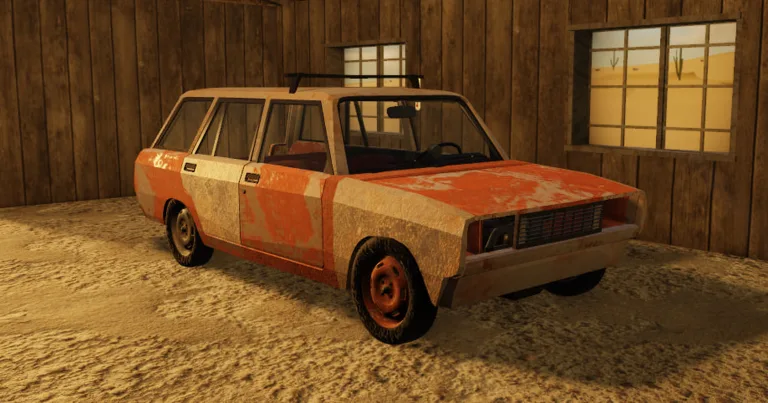
The heart of the game is your vehicle. As seen in many community highlights, players often struggle because they treat the car like a static object. In A desrt, the car is a collection of individual components that must be assembled correctly.
Essential Car Components
You start in a garage. Do not leave until you have fully inspected your vehicle. Here is what you need to focus on:
Part
Location
Why it Matters
Engine
Inside the garage
The powerhouse; without it, you aren't moving.
Radiator
Garage/Nearby
Prevents the engine from overheating.
Battery
Garage/Basement
Powers electrical components.
Fuel Tank
Garage/Outside
Holds your gasoline; keep it topped off.
Wheels
Garage/Nearby
Essential for traction and movement.
Seats
Garage
You cannot drive efficiently without sitting.
When building, look for the "snap-on" indicator. The game will show you where parts are supposed to go. Once a part snaps into place, use the weld key (Z) to secure it. Community reports suggest that failing to weld your parts is the #1 reason for early-game failure. You might think the part is secure, but the game’s physics engine is unforgiving.
Advanced Vehicle Controls
Once your car is built, you need to operate it. The a desrt controls for driving are more nuanced than a typical arcade racer. You aren't just pressing "W" to go; you are managing a transmission.
Driving Controls Table
Function
Key
Notes
Drive/Reverse
W / S
W accelerates, S brakes or reverses.
Turn
A / D
Steer the vehicle.
Ignition
R
Toggles the engine on/off.
Grab Wheel
E
Necessary to steer effectively.
Upshift/Downshift
X / Z
Manual transmission control (if enabled).
Handbrake
Space
Vital for stopping on slopes.
Clutch
Shift
Used in manual transmission modes.
If you find yourself unable to turn, check if you have grabbed the steering wheel (E). A common mistake among new players is assuming the car drives itself once the engine is on. You must actively engage with the controls.
[!TIP]
Pro-Tip: Managing Fluids
Always keep spare canisters of water, oil, and fuel. Your engine health is tied to these fluids. If your oil runs dry, your engine will seize up, leaving you stranded in the desert. Check your fluid levels frequently by looking at the gauges on your dashboard.
Survival Mechanics: Beyond the Garage
Once you leave the safety of your starting area, the game shifts from a building simulator to a survival challenge. You have a hunger bar and a thirst meter that you must manage.
Looting and Hazards
The world is filled with ruins, gas stations, and abandoned buildings. These are your primary sources for better car parts and survival supplies.
Zombies: They are a constant threat. Do not try to fight them empty-handed. Use your hammer or other melee weapons.
Physics Hazards: The game is known for "realistic" (and often hilarious) crashes. If you hit a cactus or a ramp at high speed, your car will deform, and parts will fly off. If you are not familiar with the a desrt controls to quickly exit the vehicle (E), you might find yourself trapped in a burning wreck.
Community Experience Note: Many players have reported that trying to "cheese" the physics by overloading the car with too many items (like extra tires or random furniture) usually leads to the car becoming uncontrollable. Keep your cargo load balanced and securely welded.
Troubleshooting Common Issues
Even experienced players run into issues. Here is a quick reference for when things go wrong:
Issue
Potential Cause
Solution
Car won't start
No fuel or dead battery
Check fuel tank and battery charge.
Parts falling off
Not welded
Use 'Z' to weld parts after snapping them on.
Engine overheating
No coolant/water
Check the radiator fluid levels.
Unable to steer
Steering wheel not grabbed
Press 'E' to interact with the wheel.
If you are stuck, remember that you can reset your character or the vehicle in the menu, but this should be a last resort. Always try to fix the mechanical issue first. For more technical details on vehicle physics, you can visit the official A desrt page on Roblox.
Strategic Tips for Long-Distance Travel
Surviving the long haul requires preparation. You cannot simply drive until you run out of gas. You need a strategy.
The "GPS" Role: If playing with friends, have one person act as the navigator. They should be responsible for spotting loot and keeping an eye on the fuel gauge.
Part Upgrades: As you progress, look for V8 engines or better radiators. The starter parts are reliable but inefficient.
Sandbox Mode: If you are just looking to experiment with the physics and want to see how much damage a car can take before exploding, utilize the sandbox mode. It allows you to spawn items and test builds without the risk of losing your progress. However, remember that a desrt controls still apply, so don't get too reckless!
FAQ: Frequently Asked Questions
Q: How do I fix my car when it breaks down in the middle of the desert?
A: You need to exit the vehicle and manually inspect the parts. If a part has fallen off, pick it up with 'F' and re-attach it. Use 'Z' to weld it back in place. If it is an engine issue, check your fuel, oil, and water levels.
Q: Where can I find better car parts?
A: Better parts are found by exploring structures in the world, such as gas stations, houses, and ruins. The deeper you travel into the desert, the higher the chance of finding rare upgrades.
Q: Can zombies destroy my car?
A: Yes. If zombies swarm your vehicle, they can damage parts or even break them off. It is best to clear the immediate area of zombies before you step out to loot or perform repairs. Always keep your a desrt controls for combat (LMB) ready if you have to defend your vehicle.
Q: Why does my car feel like it’s floating or glitching?
A: This is usually due to physics conflicts. If you have too many items welded poorly or clipping into each other, the physics engine may struggle, leading to "glitchy" movement. Try to keep your build clean and avoid overlapping parts.
By understanding these mechanics and staying vigilant, you will move from being a stranded survivor to a wasteland explorer. Remember, in A desrt, the journey is just as important—and often more dangerous—than the destination. Keep your welding tool handy, keep your tank full, and watch out for those zombies!